
Carl Calabria’s Guide to Using Inserts on the Mark One
You may have noticed already that Carl Calabria keeps things organized here at MarkForged. He keeps the tools clean and organized; this both increased productivity and sets the tone for a clean, organized company culture. Carl is also a fan of constantly improving, so he designed this part to both organize the tool set used to maintain a Mark One 3D printer and to improve his additive manufacturing skills.
This Mark One Maintenance Toolset Caddy contains all the bits and sockets used to service a Mark One 3D printer. It also includes two different types of inserts including 12 magnets to keep the bits in place. The inserts were added during printing using the pause function of the MarkForged printer and software.
A Step by Step Guide to Adding Inserts

1. CAD the caddy in OnShape, leaving cavities for the razor blade and 12 magnets in OnShape
2. The razor blade cavity and magnet cavities are continuous

3. No need to separate them with nylon
4. The razor blade is there because the magnets in the first version jumped out and stuck to the print head
5. Export from OnShape as a STL
6. Import the STL into the MarkForged Eiger Software
7. Click Part View
8. Click 2d view
9. Add pauses at two points
10. Scroll to select cavity layer using the layer selector at the bottom
11. Insert the first pause at Layer 10, to insert the razor blade
12. Put second pause at layer 40, to insert the magnets

13. Click pause after layer at the upper right

14. Start the print and stare in wonder as the build starts
15. When layer 10 pauses, insert the razor blades, with a thin layer of glue stick applied to the top of the razor blades
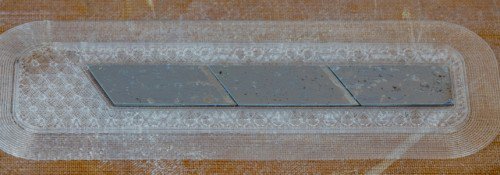
16. Click resume print on the touchscreen

17. Add some glue over the magnets, to ensure adhesion
18. Click resume print on the touchscreen
19. The rest of the caddy will print on top of the magnets

Notes
- The height of cavity should be the same size as the embedded part
- If cavities are taller, you'll be printing in midair and can have a print failure
- If too short, the print head will bump into the inserts
- Glue on the inserted hardware ensures adhesion of the layer above the inserts
- Download the STL Here
- Download the MFP Here
すべてのブログおよびブログに含まれる情報の著作権はMarkforged, Inc.に帰属し、当社の書面による許可なく複製、改変、採用することを禁じます。当社のブログには、当社のサービスマークや商標、当社の関連会社の商標が含まれている場合があります。お客様が当社のブログを使用することは、当社の事前の許可なく当社のサービスマークまたは商標を使用する権利またはライセンスを構成するものではありません。当社のブログで提供されるMarkforged情報は、専門的なアドバイスとみなされるべきではありません。当社は、新しい情報、後発事象、その他に基づいてブログを更新または修正する義務を負いません。
Never miss an article
Subscribe to get new Markforged content in your inbox