
Software Update: Material Tracking and Cloud Slicing
There is a new software update available today that includes a number of exciting new features that will help enhance your 3D printing experience with Markforged.
Out of Material Warning
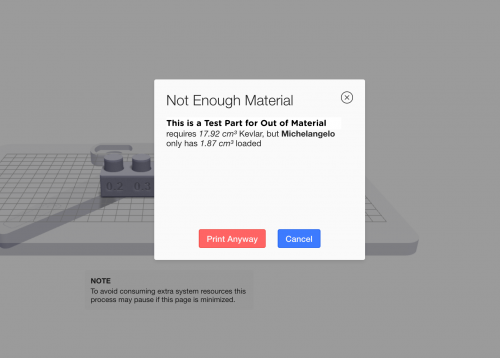
Before starting a print, the printer now will let you know if you do not have enough material to print your part.
When you load your nylon or fiber, the load utilities will include a screen that asks “How full is the spool you’re loading?”. If the spool is full, select “Full Spool”. If it is a partial spool, weigh the spool and enter the weight in grams to let the printer know how much material is available on the spool.


Before printing from Eiger, USB, or your queue, the printer will check that it has enough material left to complete the print. If it does not, it will show a warning.

Cloud Slicing in Eiger (for Enterprise Users)
We have enabled cloud slicing in Eiger for Enterprise users. This means slicing is faster AND you can continue to do other work on your computer while Eiger slices your part in the background.

In Eiger, there is a “cloud slicing” toggle (on by default), which you can use to switch back and forth between cloud and local slicing.

You can also queue parts to slice as soon as the current part completes.

For more information, check out the support page.
모든 블로그와 블로그에 포함된 정보의 저작권은 마크포지드에 있으며, 당사의 서면 허가 없이 어떤 방식으로든 복사, 수정 또는 채택할 수 없습니다. 당사의 블로그에는 당사의 서비스 마크 또는 상표뿐만 아니라 계열사의 상표가 포함될 수 있습니다. 귀하가 당사의 블로그를 사용한다고 해서 당사의 사전 허가 없이 당사의 서비스 마크 또는 상표를 사용할 수 있는 권리나 라이선스가 부여되는 것은 아닙니다. 당사 블로그에서 제공되는 상표 정보는 전문적인 조언으로 간주되어서는 안 됩니다. 당사는 새로운 정보, 후속 이벤트 등을 바탕으로 블로그를 업데이트하거나 수정할 의무가 없습니다.
새로운 정보를 놓치지 마세요
Markforged의 최신 컨텐츠를 편지함으로 받으시려면 구독하십시오.