
Software Update: Material Tracking and Cloud Slicing
There is a new software update available today that includes a number of exciting new features that will help enhance your 3D printing experience with Markforged.
Out of Material Warning
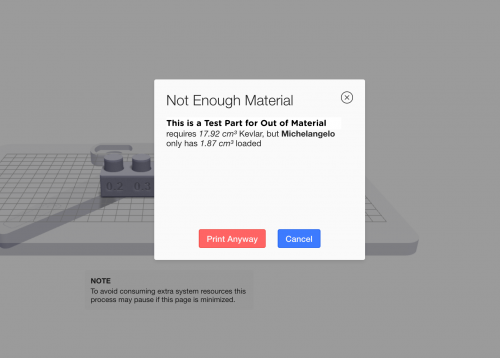
Before starting a print, the printer now will let you know if you do not have enough material to print your part.
When you load your nylon or fiber, the load utilities will include a screen that asks “How full is the spool you’re loading?”. If the spool is full, select “Full Spool”. If it is a partial spool, weigh the spool and enter the weight in grams to let the printer know how much material is available on the spool.


Before printing from Eiger, USB, or your queue, the printer will check that it has enough material left to complete the print. If it does not, it will show a warning.

Cloud Slicing in Eiger (for Enterprise Users)
We have enabled cloud slicing in Eiger for Enterprise users. This means slicing is faster AND you can continue to do other work on your computer while Eiger slices your part in the background.

In Eiger, there is a “cloud slicing” toggle (on by default), which you can use to switch back and forth between cloud and local slicing.

You can also queue parts to slice as soon as the current part completes.

For more information, check out the support page.
所有博客和博客中包含的信息版权均归 Markforged 公司所有,未经我们的书面许可,不得以任何方式复制、修改或采用。我们的博客可能包含我们的服务标志或商标,以及我们附属公司的服务标志或商标。未经我们事先许可,您使用我们的博客并不构成您使用我们的服务标记或商标的任何权利或许可。Markforged 博客中提供的信息不应被视为专业建议。我们没有义务根据新信息、后续事件或其他情况更新或修订博客。
不错过任何一篇文章
订阅以在您的收件箱中获取新的 Markforged 内容